
Hex Editors are programs that let users view and modify files at the binary level, where data appears as hexadecimal numbers instead of regular text. While many hex editors exist, YuHex stands out as a modern, lightweight option designed specifically for Windows users. Developed by Yutaka Hirata, this freeware tool launched in 2026 and quickly gained attention for its simplicity combined with powerful features.
YuHex focuses on what matters most: making binary editing accessible without overwhelming complexity. Whether you are inspecting executable files, editing game data, or analyzing logs, YuHex provides a clean interface that feels refreshing compared to older, cluttered tools.
Key Features
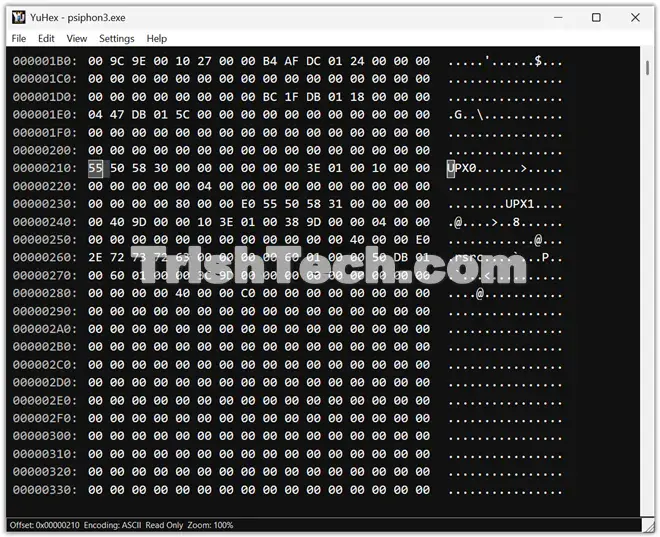
YuHex supports files larger than 4GB, a must-have for handling big datasets or disk images without performance issues. It displays data in classic hexadecimal view while allowing direct editing.
One of its standout strengths is multilingual text support. It handles multiple encodings seamlessly including the standard options like ASCII, UTF-8, UTF-16LE, and UTF-16BE.
This makes YuHex particularly useful for international users or those working with files from different regions. It even displays colored emojis properly, which is rare in traditional binary editors.
Other helpful features include:
- Dark mode for comfortable late-night work
- Zoom and font customization
- Data Inspector that shows interpretations of bytes (like integers, floats, or text)
- Struct View with pattern files (.yupat) for structured data analysis
- Search functionality and quick jump to any offset
- Recent file and search history
- Read-only mode for safe inspection
Settings are saved in a simple JSON file, making it easy to back up or share configurations.
Who Should Use YuHex?
YuHex appeals to a wide audience. Beginners new to hex editing will appreciate its straightforward design and helpful shortcuts. Professionals working with multilingual software or reverse engineering will value the broad encoding support and Struct View.
For example, a game modder can easily edit binary resources with proper emoji or Asian character display. A security researcher can analyze suspicious files safely in read-only mode. Developers debugging cross-platform issues benefit from the many text encodings.
The tool runs as a native Windows application on Windows 11 (64-bit) without needing .NET Framework, ensuring good performance and high-DPI screen support.
Easy Navigation and Keyboard Shortcuts
YuHex shines with its keyboard-friendly design. Common actions use familiar shortcuts: Ctrl+F to search, Ctrl+G to jump to an offset, and Ctrl+R to toggle read-only mode.
In the hex dump area, arrow keys move byte by byte, while Page Up/Down handles larger jumps. You can type hex values directly (0-9, A-F) or switch between overwrite and insert modes. The Data Inspector and Struct View have their own convenient shortcuts too.
This focus on keyboard efficiency speeds up workflows for power users while keeping the mouse-friendly interface for everyone else.
Potential Use Cases
- Software Development: Debugging binary protocols or resource files
- Digital Forensics: Safe inspection of drives and files
- Game Modding: Editing assets with proper visual feedback
- Data Recovery: Analyzing corrupted files
- Education: Learning about how computers store information
Its lightweight nature means it runs smoothly even on modest hardware.
Conclusion
YuHex brings fresh air to the hex editor space. By combining essential binary editing tools with excellent multilingual support, modern conveniences like dark mode and emoji display, and a focus on simplicity, it serves both newcomers and experienced users well. In a field often dominated by complex commercial software, YuHex proves that powerful tools can also be approachable and free.
You can download YuHex from https://yutakasan.11ya.net/software/YuHex/readme.html.