
FlyOutNotePad is a lightweight, free Windows tool that acts as an always-ready helper for handling text, code snippets, and images. Instead of switching between windows or losing focus, this smart notepad docks to any screen edge and “flies out” when you need it. Developed by Nenad Hrg of softwareok.com, the program stays out of your way until you hover your mouse over a thin strip. Then it smoothly expands, giving instant access to your notes and visuals.
What Makes FlyOutNotePad Different?
Most note-taking apps sit on your desktop or in the taskbar as full windows. FlyOutNotePad takes a smarter approach. You can dock it to the left, right, top, or bottom edge of your screen. In docked mode, only a narrow indicator bar remains visible. Move your mouse over that bar, and the window elegantly slides out with a smooth animation.
This 360-degree docking freedom lets you customize your workspace exactly how you like it. Whether you work on a large monitor or a laptop, the tool adapts without taking up valuable screen space. When you finish, it gently slides back, staying ready for the next task.
Core Features That Boost Productivity
Bidirectional Drag and Drop
The standout feature is effortless drag-and-drop support. You can drag text or images from any application directly into FlyOutNotePad. The program automatically detects the content type and switches to the correct tab—Text or Image. No manual selection needed.
You can also drag content back out. Need a saved code snippet in your IDE? Just pull it from the notepad into your editor. Working with graphics? Drag an image preview straight into Photoshop, Word, or a web tool. This two-way flow turns FlyOutNotePad into a true workflow bridge.
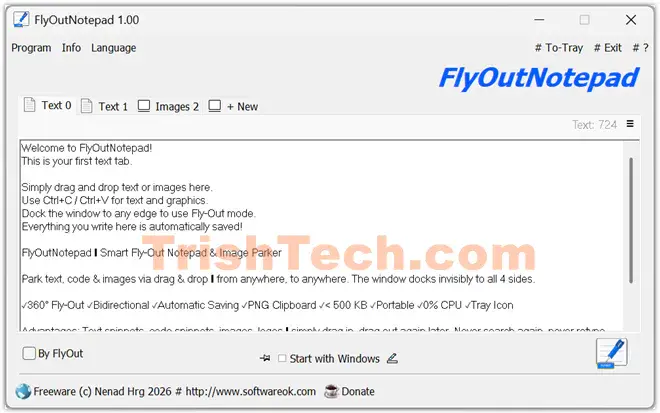
Multiple Tabs for Better Organization
The tool supports up to 20 tabs, mixing text and image types. Each tab works independently. You can store quick notes, important URLs, code fragments, or reference images without creating separate files. A “Clear All Tabs” option lets you reset everything when starting a new project.
Automatic Saving and Data Safety
Everything saves automatically in the background. Restart your computer or experience a crash? Your content returns exactly as you left it. The program also fully supports clipboard operations, including transparent PNG images with alpha channels via simple Ctrl+C and Ctrl+V.
Tray Integration and Minimal Footprint
FlyOutNotePad minimizes to the system tray, keeping your taskbar clean. Right-click the tray icon for quick options to show, hide, or exit the app. The executable is only about 500 KB with virtually zero CPU usage when idle and very low RAM consumption (typically under 10 MB). It runs natively in C++ for fast, responsive performance.
Easy to Use – No Installation Required
One of the best things about FlyOutNotePad is its portability. Download the small EXE file (around 204 KB), run it, and you are ready. No setup wizard, no registry changes, and no leftover files when you decide to remove it.
For even more flexibility, rename the file to FlyOutNotePad_p.exe to activate true portable mode. In this mode, all settings and data stay inside the program’s folder—perfect for carrying on a USB drive or using on multiple computers.
Quick Start in Under 60 Seconds
- Launch the program – a small window appears.
- Drag the title bar to your preferred screen edge to dock it.
- Hover over the thin strip to make it fly out.
- Drag text from a website or an image from your folder into a tab.
- Later, drag that content into any other application.
That’s it. The interface stays simple and intuitive so you can focus on work instead of learning complex menus.
Who Benefits Most from FlyOutNotePad?
- Coders and Developers: Keep code snippets, API keys, or error messages handy without cluttering your editor.
- Graphic Designers: Temporarily store reference images or logos and pull them into design software instantly.
- Office Workers: Save important emails, URLs, or meeting notes and move them between Word, Outlook, and browsers with ease.
- Power Users: Anyone who switches between many apps and hates losing their train of thought.
Because it supports Windows 7 through 11 (32-bit and 64-bit) plus server versions, almost any Windows user can benefit. The tool also includes language file support, making it accessible for non-English speakers.
Conclusion
FlyOutNotePad brings a fresh, intelligent solution to an everyday problem—managing bits of information while staying focused on the main task. Its elegant fly-out docking, bidirectional drag-and-drop, automatic saving, and tiny resource footprint make it a valuable addition to any Windows workflow.
Whether you need a temporary home for code snippets, reference images, or quick notes, this smart sidekick delivers speed and simplicity. Best of all, it is completely free.
With its thoughtful design and practical features, FlyOutNotePad proves that powerful tools do not need to be complicated or heavy. It quietly enhances productivity and keeps your digital workspace organized and efficient. If you value speed, minimalism, and seamless integration in your daily computing, FlyOutNotePad is worth exploring today.
You can download FlyOutNotePad from https://www.softwareok.com/?seite=Freeware/FlyOutNotePad.