
WobblePic is a free interactive image viewer that lets you grab, stretch, and play with photos like they are made of soft rubber or jelly. Just drag any part of an image, and watch it wobble, bounce, and spring back in a satisfying way. It turns ordinary pictures into playful, physics-driven experiences. Available for Windows and macOS, this tool stands out because it feels magical yet runs smoothly on regular computers.
What Makes WobblePic Special?
Most photo viewers only let you zoom or pan. WobblePic goes much further. It uses real-time soft-body physics to make images behave like elastic material. Click and drag on a photo, and the area stretches realistically. Release your mouse, and it jiggles back into shape with natural inertia and damping.
The secret lies in its smart technology. The app places the image on an invisible grid mesh rendered with fast OpenGL shaders. When you drag, nearby points on the mesh follow your cursor with a smooth falloff effect. Springs then pull everything back, creating that fun wobble. It runs at 60 frames per second on most modern GPUs, so everything feels buttery smooth.
Another standout feature is AI-powered segmentation using SAM2 (Segment Anything Model 2). Click on an object like a person’s face, a pet, or a flower, and the AI automatically detects its edges. Only that selected part wobbles while the rest stays still. This makes interactions feel precise and creative. On Windows, it uses DirectML acceleration; on Mac, it taps into the Apple Neural Engine for speed.
Easy to Use for Everyone
WobblePic keeps things simple so anyone can enjoy it right away. Drag and drop your photos into the app, or browse folders with the built-in file explorer. It supports a wide range of formats including JPG, PNG, WebP, GIF, HEIC, and more.
Keyboard shortcuts make navigation quick. Use arrow keys or your mouse wheel to flip through images in a folder. Zoom in up to 10x, pan around, or rotate pictures with a single key. Right-click menus let you copy, rename, or delete files without leaving the app.
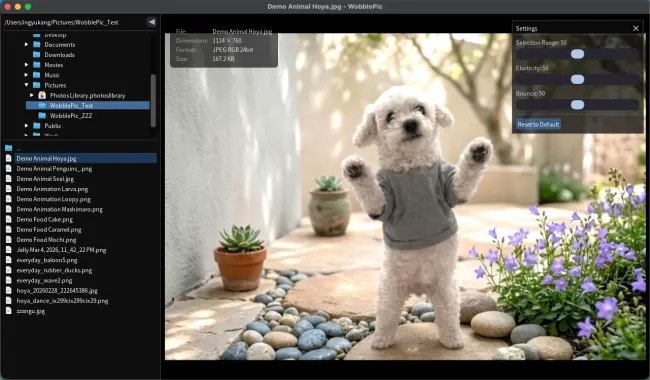
For extra fun, try the segmentation tools. Shift-click to add or subtract from a selection. You can even pin parts of the image so they stay fixed while others move freely. Settings allow you to tweak elasticity, damping, and bounce strength in real time.
The app remembers your window size and position, and it scales nicely on high-resolution screens. Whether you are on a laptop or desktop, it feels polished and responsive.
Record Your Wobbles and Share the Fun
One of the coolest additions is the ability to record your interactions. Press Ctrl+R (or Cmd+R on Mac) while playing with an image, and WobblePic captures the entire session as a WebP animation. Drag, segment, and let it bounce — everything gets saved in one smooth file. No extra screen recorder needed.
You can also open and play existing animated files like GIFs, WebP, or APNG directly in the viewer. This turns WobblePic into a handy player for motion content too. Share your recorded wobbles with friends via social media or messaging apps for instant laughs.
Imagine making your cat’s tail wag or a balloon stretch and snap back. These short clips add personality to static photos and work great for memes, stories, or just personal entertainment.
Who Will Love WobblePic?
Artists and photographers can use it to explore new ways of seeing their work. Drag elements to test compositions or create quirky visuals. Parents might enjoy wobbling family photos with kids for silly reactions. Pet lovers can make their dogs’ ears flop or tails wag in funny ways.
Teachers could demonstrate basic physics concepts like springs and elasticity in a visual, engaging manner. Content creators might record wobbles as starting points for more advanced edits in tools like After Effects.
Since it is completely free (with an optional low-cost license to remove any ads), it lowers the barrier for experimentation. No subscriptions or complicated setups — just download, install, and start playing.
On Windows, grab the .exe installer. On macOS, download the right .dmg file for your chip (Apple Silicon or Intel) and drag the app to your Applications folder. It works on Windows 10 and newer, plus recent macOS versions.
Conclusion
WobblePic brings a refreshing dose of joy to digital photos. By blending real-time physics, smart AI, and easy controls, it transforms passive viewing into active play. Whether you want a quick laugh, creative experimentation, or a new way to share memories, this tool delivers satisfying results without complexity.
In a world full of serious editing software, WobblePic reminds us that technology can simply be fun. Download it today, grab your favorite image, and let it wobble. You might just find yourself smiling as ordinary pictures come alive with bouncy, rubbery energy.
You can download WobblePic from https://wobblepic.com/.