
In a world of heavy antivirus suites that demand subscriptions, constant updates, and background services, Thunderbird Anti-Virus Scanner takes a different path. It is a free, portable tool for Windows made by Thunderbird Software that focuses on two ideas: speed and visibility. You do not install it, you do not create an account, you just download, extract, and run. It is designed to give you a quick, honest look at what is happening inside your PC without slowing down games, work, or older hardware.
No Installation, Just Run It
The core promise is simplicity. Thunder Anti-Virus Free Scanner requires no installation; simply download the file, extract it, and run it on any Windows PC to safeguard your system against potential threats. Because it is portable, you can keep it on a USB drive and use it on a friend’s laptop, an office PC, or a fresh Windows install.
The developers are clear about its role. It is a scanner first, not a full internet security suite, so they recommend you still use a complete antivirus for everyday protection. Think of Thunderbird as the flashlight you pull out when you want a second opinion.
Four Ways to Scan: The Quad-Scan Engine
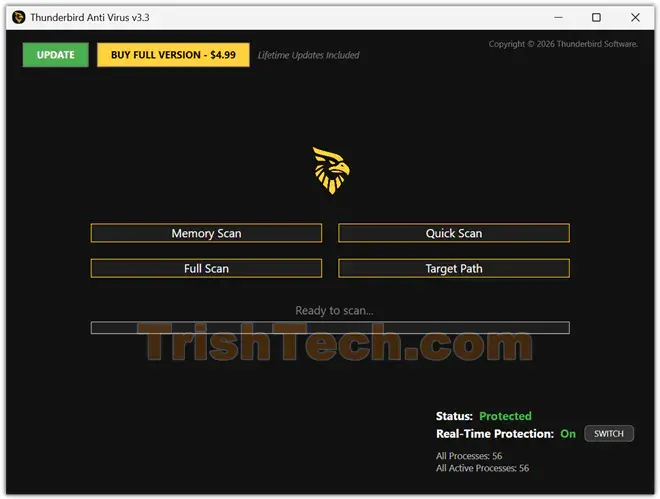
Instead of one big “scan everything” button, Thunderbird gives you four focused options, called the Quad-Scan Engine.
- Memory Scan checks running processes for real-time threats.
- Quick Scan looks at system folders where malware usually hides.
- Full Scan does a deep drive audit across hard drives and connected devices.
- Target Scan lets you pick a specific folder or download for a fast check.
The comprehensive system scan checks memory, hard drives, and connected devices for malware, viruses, and trojans, while the targeted folder scan is ideal when you want to check specific locations without scanning the entire system.
Real Protection Without Slowing You Down
Thunderbird v3.1 is described as a high-performance security scanner built on a modern WPF framework, offering a “no-nonsense” approach to malware detection without draining PC resources. Version 3.2 continues that idea, offering a streamlined yet uncompromising shield with enhanced heuristic analysis optimized for Windows 10 and 11.
Key defense features include:
Real-Time Threat Detection: Monitors system activity to block malware, ransomware, and spyware before they can execute.
Heuristic Engine: Advanced algorithms identify new, “zero-day” threats based on suspicious behavior, not just known signatures.
Deep System Scanning: Targets hidden trojans and persistent threats in the deepest layers of storage.
Smart Quarantine: Safely isolates suspicious files so you can review them later.
Ultra-Light Footprint: Built for performance, it operates silently in the background so gaming or work sessions remain uninterrupted.
Not a Full Anti-virus Software
It is important to set expectations. Thunderbird does not replace Windows Defender or a paid suite for real-time web protection, firewall control, or parental controls. It helps guard against a range of threats, but you should supplement with a full antivirus solution for comprehensive protection. Use it as a portable second-opinion scanner, a cleanup tool after an infection, or a quick check before you open a suspicious USB.
Conclusion
Thunderbird Anti-Virus Scanner is not flashy, and that is the point. It strips antivirus down to fast scans, clear logs, and a light footprint you can carry anywhere. With its Quad-Scan Engine, heuristic zero-day detection, smart quarantine, and live process monitor, it gives you control without the usual slowdown. For Windows 10 and 11 users looking for a free, portable, honest scanner to complement their main protection, Thunderbird Anti-Virus Scanner is a refreshingly simple tool worth keeping on your desktop, or better yet, on your USB key.
You can download a trial version of Thunderbird Anti-Virus Scanner from https://thunderbirdav.com/.