
In today’s connected world, knowing what devices are on your network is essential. Whether you’re a home user checking for unknown gadgets or an IT professional securing a business network, a reliable IP scanner makes the job simple. Vovsoft IP Scanner stands out as a lightweight, no-cost Windows tool designed to quickly detect devices and open ports on both local area networks (LAN) and wider internet ranges (WAN).
It offers a straightforward way to map networks without complicated setups or hidden fees. It focuses on speed, accuracy, and ease of use, making it ideal for everyday network troubleshooting and security checks.
What Is Vovsoft IP Scanner?
Vovsoft IP Scanner is an administration utility that reveals active network devices and checks their open ports. It helps users audit their networks by identifying IP addresses, verifying device availability, and detecting services running on specific ports.
Unlike heavier enterprise tools that require installation of agents or subscriptions, Vovsoft keeps things simple. It comes in both installer and portable editions, so you can run it directly from a USB drive without leaving traces on the host computer. The software is fully functional freeware with no advertisements, nag screens, or limitations.
Key Features That Make It Stand Out
Vovsoft IP Scanner uses a high-performance multi-threaded scanning engine. Instead of checking one IP address at a time, it distributes tasks across multiple threads. This allows it to scan hundreds of addresses and ports simultaneously, delivering results in seconds even on large subnets.
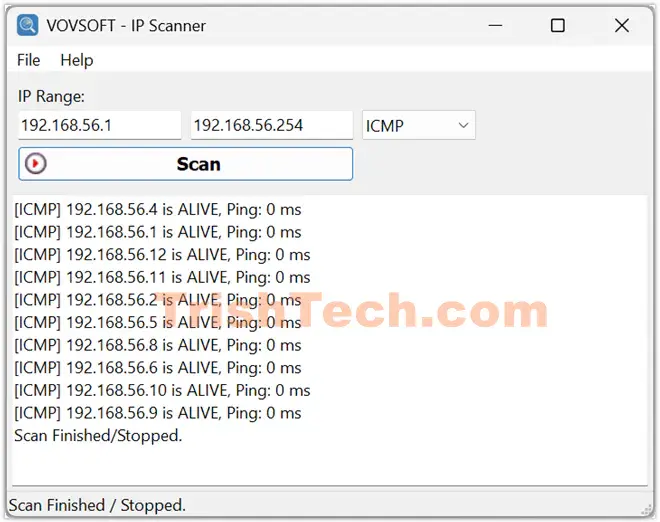
The tool combines three powerful discovery methods for maximum reliability:
- ICMP (Ping): Sends echo requests to check if a device is reachable and measures response time.
- ARP: Resolves IP addresses to MAC addresses, especially useful on local networks.
- TCP: Performs connection handshakes to verify hosts and detect active services.
This multi-method approach ensures better detection even when firewalls or network conditions block one technique.
For port scanning, users can define custom TCP port ranges. The multi-threaded engine then probes these ports in parallel, quickly identifying which ones are open or closed. Common ports like 80 (HTTP) or 443 (HTTPS) can reveal web services running on devices.
Other practical aspects include:
- Support for scanning both LAN and external WAN IP ranges.
- Lightweight design that consumes minimal system resources.
- Clean, English-language interface focused on core functionality.
- Compatibility with Windows 11, 10, 8/8.1, 7, and Vista (32-bit and 64-bit).
How Vovsoft IP Scanner Works
Using the tool is straightforward. You specify an IP range—such as 192.168.1.1 to 192.168.1.254 for a typical home network or a broader public range for WAN scanning. The software then launches its multi-threaded scan.
During the process, it pings devices, resolves MAC addresses where possible, and attempts TCP handshakes. Results appear in a clear list showing active hosts, response times, and port status. For port scanning, you simply enter the desired port range, and the tool checks them efficiently.
This combination of methods helps overcome common network challenges. For example, if ICMP is blocked by a firewall, ARP or TCP might still detect the device. The speed comes from parallel processing, so even scanning thousands of addresses feels responsive.
Practical Uses
Vovsoft IP Scanner serves many real-world needs:
Home Network Management: Parents or tech-savvy users can quickly see all connected devices, spot unknown phones or smart gadgets, and identify potential security risks like unauthorized IoT devices.
IT Troubleshooting: Network admins use it to map office LANs, locate printers or servers that have gone offline, and check which services are running. Fast scans help during outages or when adding new equipment.
Security Audits: By revealing open ports, the tool helps identify exposed services that might need firewall rules or updates. Regular scans can highlight changes in the network over time.
Remote Network Exploration: The ability to scan WAN ranges allows cautious probing of external addresses (always with proper authorization and legal compliance in mind).
Because it’s portable and free, it’s also handy for field technicians who need a quick diagnostic tool on different machines.
Conclusion
Vovsoft IP Scanner is a small but powerful network tools that quickly reveals information about connected devices over LAN or WAN. With its fast multi-threaded engine, smart combination of ICMP, ARP, and TCP methods, and completely free license, it delivers genuine value for anyone who manages or audits networks.
Whether you’re securing your home Wi-Fi, troubleshooting an office LAN, or simply curious about connected devices, this lightweight utility offers speed and accuracy without the bloat. In a world full of subscription software, Vovsoft’s commitment to simple, effective freeware is refreshing.
If you work with networks regularly or want a no-risk way to understand your digital environment better, give Vovsoft IP Scanner a try.
You can download Vovsoft IP Scanner from https://vovsoft.com/software/ip-scanner/.