
Many Windows users rely on Remote Desktop Protocol (RDP) on Windows Servers and Desktops to manage systems from anywhere. But this convenience comes with serious risks. Hackers constantly scan the internet for exposed RDP ports and launch brute force attacks, trying thousands of password combinations to break in. BruteFence offers a simple, effective solution to stop these threats before they cause damage.
What Is BruteFence?
BruteFence is a lightweight security program designed specifically for Windows environments. It protects servers and desktops from RDP brute force attacks by monitoring login attempts in real time and automatically blocking suspicious IP addresses.
Unlike complex security suites that require extensive setup, BruteFence focuses on one key problem: stopping attackers who hammer your server with wrong passwords. It integrates directly with the Windows Firewall, making it fast and reliable. Many users can get it running in just five minutes, with a free 7-day trial available to test its effectiveness.
Why RDP Brute Force Attacks Are a Growing Threat
RDP brute force attacks remain one of the most common ways cybercriminals target businesses in 2026. Attackers use automated tools to scan for open port 3389 (the default RDP port) and then try common usernames and passwords repeatedly.
These attacks don’t need sophisticated skills. Scripts run 24/7, often from botnets spread across the globe. A successful breach can lead to ransomware, data theft, or the server being used for further attacks. Even strong passwords aren’t enough if attackers get unlimited attempts. BruteFence addresses this by cutting off attackers early.
Small and medium businesses are especially vulnerable because they often expose RDP directly to the internet for convenience, without advanced security layers like VPNs or multi-factor authentication (MFA).
How BruteFence Works
BruteFence keeps a constant watch on Windows Security Event Logs, particularly Event ID 4625, which records failed login attempts. When it detects too many failures from the same IP address within a short time, it springs into action.
Key steps in its protection process:
- Real-time monitoring: It runs quietly in the background with very low resource usage—typically around 1% CPU and under 50 MB RAM.
- Automatic blocking: Suspicious IPs are added to the Windows Firewall rules, stopping further connection attempts.
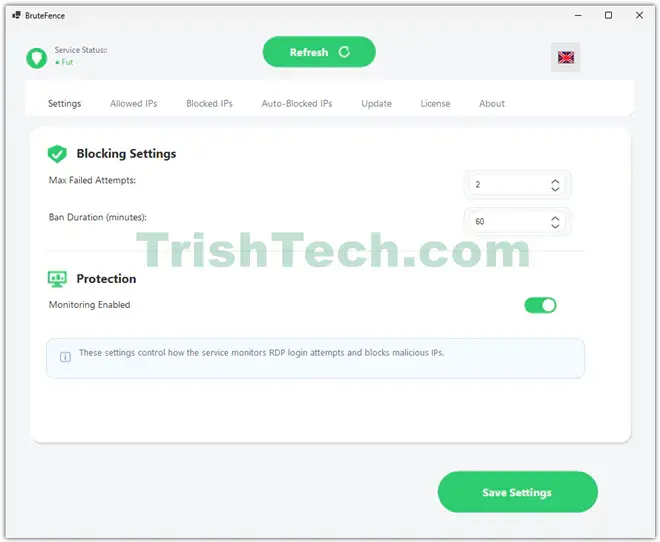
- Smart rules: You can customize thresholds, such as how many failed attempts trigger a block and how long the block lasts.
- Whitelisting: Add trusted IP addresses or ranges so you never lock yourself out.
- Easy management: A simple interface lets you view blocked IPs, adjust settings, and monitor activity.
This approach is proactive. Instead of waiting for an attack to succeed, BruteFence stops it at the source. It works on both Windows Server and Desktop editions.
Key Features of BruteFence
BruteFence stands out with several user-friendly features:
- Continuous Server Monitoring: It watches for threats around the clock without slowing down your system.
- Never Lock Yourself Out: Built-in safeguards and customizable whitelists protect legitimate users.
- You Control the Rules: Tailor protection to your needs—block after 5 attempts, 10 attempts, or set different rules for different times.
- Automatic Windows Firewall Integration: No need for extra software; it uses tools already built into Windows.
- Low Impact: Designed to run efficiently even on busy servers.
It also includes logging and reporting so administrators can review attack patterns and strengthen their overall security.
Benefits for Businesses and IT Pros
Using BruteFence brings peace of mind. IT administrators spend less time checking event logs for attacks and more time on productive work. Businesses reduce the risk of costly breaches, downtime, and data loss.
It serves as an excellent additional layer even if you use VPNs or MFA. For environments where full VPN adoption is challenging, BruteFence provides vital protection without major changes to workflows.
Users also appreciate its “set it and forget it” nature. Once configured, it works silently while delivering clear alerts when action is needed.
Conclusion
In an era where cyber threats evolve daily, protecting remote access points like RDP is non-negotiable. BruteFence delivers targeted, efficient defense against brute force attacks, making it an ideal choice for Windows users who need reliable protection without complexity.
Its quick setup, low resource demands, and customizable rules make it accessible for both small businesses and larger IT environments. By automatically blocking threats and integrating seamlessly with Windows tools, BruteFence helps keep your servers secure so you can focus on what matters most—running your business.
If your Windows server has RDP enabled, consider giving BruteFence a try with its free trial. In just a few minutes, you can add a powerful shield against one of the most persistent online dangers.
You can download a trial version of BruteFence from https://brutefence.com/en.