
In a world where Microsoft has phased out WordPad from newer versions of Windows, many users are searching for a simple yet capable replacement. Cobasoft Note (CsNote) stands out as an excellent choice. This lightweight, accessible rich text editor offers everything you loved about WordPad—plus powerful voice support and smart organization tools—without unnecessary complexity.
What Makes CsNote a Great WordPad Alternative?
Microsoft WordPad (also known as Write) was long a favorite for quick rich text editing on Windows. It handled RTF files, basic formatting, and simple notes without the heavy footprint of full word processors like Microsoft Word. However, with WordPad no longer updated and removed from recent Windows 11 versions, users need a reliable successor.
CsNote fills this gap perfectly. It serves as a modern, accessible alternative to both WordPad and the older Nuance DragonPad. Designed specifically for planning and note-taking, it keeps the familiar simplicity of WordPad while adding thoughtful enhancements for everyday productivity.
Like WordPad, CsNote works with standard RTF (Rich Text Format) files. This ensures your documents remain compatible across programs, easy to share, back up, or open in other apps. You won’t face format issues or lock-in—your files stay clean and portable.
Seamless Voice Control with Dragon NaturallySpeaking
One area where CsNote goes far beyond traditional WordPad is voice integration. It works flawlessly with Dragon NaturallySpeaking, letting you control every aspect—dictating text, applying formatting, navigating documents, and managing files—using only your voice. No extra plug-ins or complicated setups are required.
This makes CsNote especially valuable for hands-free users, accessibility needs, or anyone who prefers speaking over typing. While WordPad offered basic functionality, CsNote turns voice into a complete workflow, making it far more powerful for real-world use.
Key Features for Daily Productivity
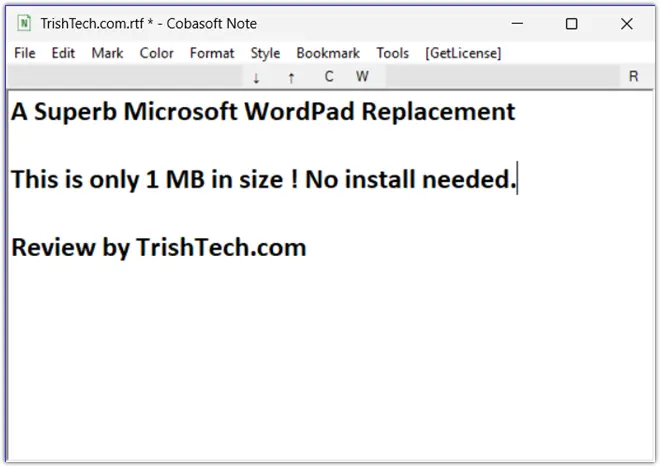
CsNote keeps its interface clean and distraction-free, much like the straightforward WordPad experience, but with more useful tools:
- Easy File Handling: Create, open, and save RTF files quickly. It remembers your recent documents (up to 10), window positions, and even bookmarks. Dark mode support with a black background option adds comfort for long sessions.
- Smart Text Editing: Enjoy unlimited undo/redo, cut/copy/paste, search and replace with history, and tools to clean up pasted text. Select text by hierarchy, paragraph, or word with simple commands.
- Formatting and Highlighting: Apply bold, italic, underline, strikeout, alignment, superscript, and subscript. Indent or outdent paragraphs easily. Highlight with 10 customizable background colors and 10 text colors—perfect for emphasizing key points without overwhelming options.
- Helpful Paragraph Styles: Use headings, bullet lists, code style (in two sizes), tiny text for side notes, and priority markers (1-4 for tasks, 0 for completed items). These styles make it simple to build hierarchical outlines and structured notes.
- Bookmarks and Navigation: Set up to 10 bookmarks per document. They save automatically and restore when you reopen the file, helping you jump around large notes effortlessly.
- Extra Utilities: Insert business emojis and symbols, check zoom level or line/column position, and go directly to any line.
These features maintain the lightweight feel of WordPad while adding structure that helps with brainstorming, troubleshooting, and planning.
Who Benefits Most from CsNote?
CsNote is ideal for:
- Windows users seeking a WordPad replacement — especially those who miss its simplicity after the removal from Windows 11.
- Voice users relying on Dragon NaturallySpeaking for dictation and full control.
- Developers and troubleshooters who need to log errors, steps, and solutions in neat, structured RTF files.
- Project planners building hierarchical task lists with priorities and notes.
- Writers and thinkers creating text-based mind maps or organizing ideas quickly.
- Anyone wanting speed and focus without the bloat of full office suites.
It excels at daily writing, organizing research, and capturing thoughts without forcing you into complex menus or cloud services.
Conclusion
Cobasoft Note (CsNote) is more than just another text editor—it’s a thoughtful, accessible replacement for Microsoft WordPad on Windows. With its clean design, strong Dragon NaturallySpeaking integration, and useful organization tools, it brings simplicity and productivity together in one lightweight package.
If you’re tired of complicated apps or missing the straightforward experience of WordPad, give CsNote a try. It captures the spirit of the classic tool while adding modern accessibility and structure that helps you work smarter every day. In an era of bloated software, CsNote reminds us that sometimes less really is more—especially when it’s designed this well.
You can download Cobasoft Note (CsNote) (Trial Version) from https://cobasoft.net/en/csnote/.