
StaticDesktopRuler is a lightweight Windows utility that solves a simple but annoying problem: losing your place on huge monitors or wide spreadsheets. Developed by SoftwareOK, this tool puts up to 20 fully customizable rulers on your desktop that stay out of your way until you actually need them.
What StaticDesktopRuler Actually Does
Unlike most on-screen rulers that sit in front of everything and block clicks, StaticDesktopRuler uses “Ghost Technology.” The rulers are normally click-through, so your mouse interacts with the app underneath them. You only “grab” a ruler when you hold CTRL + SHIFT, which activates Smart Edit mode for the one under your cursor.
Each ruler is independent. You can set its color, width from 1-50 pixels, and transparency per line. Need a subtle gray guide for reading PDFs and a bright red one for aligning charts? You can run both at the same time. The tool supports up to 20 rulers simultaneously, so you can build full grids or just drop a single reading line.
Why You Need a Static Screen Ruler
Monitors keep getting bigger. Ultra-wide and multi-monitor setups give you space, but they also make it easy to lose your place in Excel, CAD, code logs, or long documents. One blink and you’re scanning for the right row again.
StaticDesktopRuler acts as a visual anchor. It’s always present but completely passive. Because it doesn’t hijack your mouse or force you to hide/unhide the app, it doesn’t interrupt your workflow like conventional guide tools do.
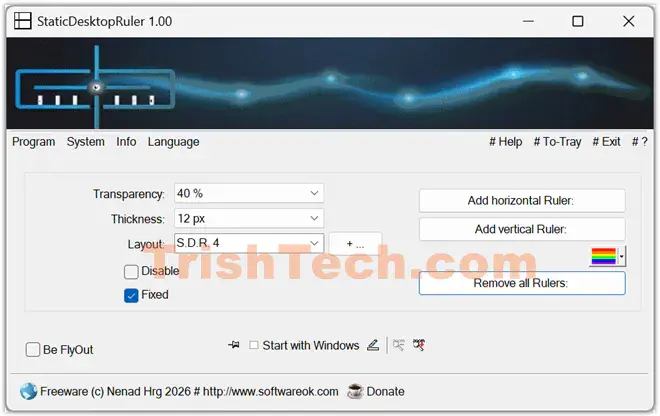
Ghost Mode and Smart Edit: The Core Concept
The big innovation is how it handles interaction:
- Ghost mode: Default state. Rulers are visible but “empty” to Windows. You click straight through to your spreadsheet, browser, or game.
- Smart Edit: Hold CTRL + SHIFT and only the ruler under your cursor becomes active. Drag to move, right-click to change color, width, or delete it.
- Fly-Out: Controls appear on mouseover or click, so the interface stays minimal until you need it.
This toggle system means you can adjust a guide while typing an email and keep writing without touching a global on/off switch.
Key Features
- Massive flexibility: 20 rulers, horizontal or vertical, across all monitors.
- Per-ruler customization: Color, 1-50px thickness, alpha transparency.
- Layout saving: Save setups with a button and reload them from a combo box for different projects.
- Always on Top option: Keep guides visible over full-screen apps without stealing focus.
- Resource efficient: Native C++/Win32 build keeps CPU and memory use minimal.
- Portable: No install needed. Rename the EXE to StaticDesktopRuler_p.exe to force portable mode and store the INI next to the app (in the same folder).
- Multi-monitor: Recognizes the full virtual desktop, so lines span every connected screen.
Conclusion
StaticDesktopRuler fills a gap most people don’t realize they have until they work on a 32-inch 4K monitor or a triple-screen setup. By combining up to 20 per-ruler settings with true ghost-mode click-through, it gives you physical-ruler reliability without the workflow tax.
It’s native, portable, and light on resources, so it can run all day without slowing you down. If your job involves lining up data, design, or text across pixels, this is the kind of small tool that saves hours of eye strain and re-scanning. In an era of complex digital workspaces, clarity is king, and StaticDesktopRuler is a smart, unobtrusive way to get it.
You can download StaticDesktopRuler from https://www.softwareok.com/?seite=Freeware/StaticDesktopRuler.