
If you have ever typed “what is my IP” into Google, you know how common the question is. Your IP address is your online ID, and it changes more often than you think, especially if you use a VPN, work from different networks, or have a dynamic connection from your ISP.
Get My IP is a free Windows program by developer Timthreetwelve that puts that answer right on your desktop, without opening a browser. It is not just a number viewer. It shows your internal and external addresses, adds location data, and lives quietly in your system tray until you need it.
What Is Get My IP?
Get My IP shows IP address and geo-location information in one clean window. It is built for Windows and runs on .NET 8, with self-contained versions available if you do not have .NET installed.
Unlike web tools that only give you your public IP, this app shows both sides of your network:
- Your external IP, the one websites see.
- Your internal IPs, the addresses your router gives to each device on your home/office network.
If you have more than one network adapter, Wi-Fi, Ethernet, virtual machines, it lists them all.
Why You Might Need It
Most people check their IP once and forget it. But there are everyday reasons to watch it more closely.
If you use a VPN to watch content from another country, you want instant proof that your location actually changed. Get My IP solves this with its flag tray icon, which changes to match the country of your current IP. A quick glance tells you if the VPN is working, no website needed.
For gamers, remote workers, or anyone doing port forwarding, knowing your internal and external IPs is essential. The app also helps when your ISP changes your address without warning. With optional automatic refresh and a notification when the external IP changes, you are aware of unexpected changes.
Key Features
Get My IP started simple, but it has grown into a full toolbox:
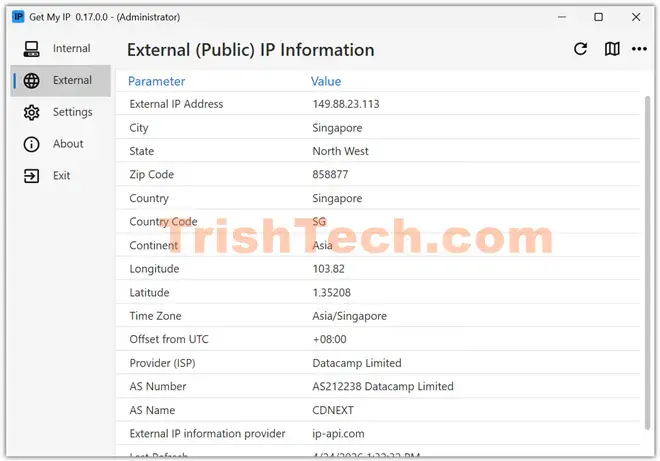
- Geolocation from multiple providers. Choose from several data sources instead of being locked to one. It pulls continent, country, region, city, zip code, latitude and longitude, time zone, and ISP for your external IP.
- Maps in one click. Open your location in Google Maps, Bing Maps, OpenStreetMap, or LatLong.net directly from the app.
- Copy and save. Copy any value with a right-click, or copy the whole table in tab-delimited format for Excel. You can also save data to a text file or write external IP info to a log file.
- Tray customization. Minimize to tray, customize the tooltip details, and even show a country flag instead of a standard icon.
- Appearance options. Pick from four themes, change accent color, font, and font size.
- IPv6 support. Optionally show IPv6 addresses for internal networks.
- Raw data view. View and save the raw JSON returned by geolocation providers, useful for debugging.
- Multilingual. Since version 0.9.0, languages are being added by contributors.
How It Works in Daily Use
Install it from the releases page, portable versions are also offered if you prefer no installer. Open the app and you see two tabs: Internal and External.
The Internal tab lists every local address. The External tab shows your public IP and all the geolocation details. Click “Map” and your browser opens to your coordinates.
Set auto-refresh to as low as one minute. Each refresh calls your chosen geolocation provider. If you leave it running, it will notify you the moment your public IP changes, which is handy for VPN drops or ISP resets.
Because it is lightweight and runs locally, you are not loading ad-heavy websites each time. Softpedia describes it well: unlike most online tools, Get My IP reveals both the external and internal IP while dumping a ton of geolocation data.
Conclusion
Get My IP takes a task we usually do in a browser and makes it faster, clearer, and always available. For normal users, it answers “what is my IP” in one click. For power users, it becomes a quiet monitor that confirms VPN location, logs IP changes, and exports data for troubleshooting.
If you work with networks, game online, or just want to know when your digital address shifts, this small Windows utility is worth keeping in your tray. It is simple to read, easy to customize, and does exactly what its name promises: get your IP, and tell you the story behind it.
You can download “Get My IP” from https://github.com/Timthreetwelve/GetMyIP.