
In the online world, websites, apps, and much of the online services depend on invisible security shields called TLS/SSL certificates. These digital passports prove a site is genuine and encrypt data so hackers cannot steal passwords or credit cards. Yet many people forget about them until something goes wrong. An expired certificate can trigger scary browser warnings, break customer trust, or even shut down an entire website. That is exactly why a smart, easy-to-use tool like Certificate Monitor matters. Developed by SoftPerfect, this free desktop application watches your certificates around the clock and alerts you before trouble starts.
What are SSL/TLS Certificates and Why Monitor Them?
Think of an SSL/TLS certificate as a lock and key for your online traffic. When you visit a secure site, your browser checks the certificate to confirm the owner and establish an encrypted connection. Certificates have an expiry date—usually 30 to 398 days—and must be renewed on time. They also need strong encryption settings and a complete chain of trust from the issuing company.
If a certificate expires, visitors see “Not secure” messages. If the settings are weak, attackers can intercept data. Even internal company servers, mail systems, VPNs, and home devices use these certificates. Traditional online checkers only work for public websites and cannot reach private networks. That leaves a big gap in security for most organizations. Regular monitoring closes that gap by spotting problems early.
The Hidden Risks of Ignoring Certificate Health
Expired certificates cause real headaches. E-commerce sites lose sales when shoppers see security warnings. Internal tools stop working, frustrating employees. Compliance rules in healthcare, finance, and government often require proof that certificates stay valid and strong. A single missed renewal can lead to downtime that costs thousands of dollars per hour. Worse, weak certificates open doors to man-in-the-middle attacks.
Manual checks are tedious. You would need to visit every server, run commands, and remember dozens of expiry dates. Most people skip the task until panic sets in. Automated monitoring tools solve this, but many cloud services charge monthly fees, send your host list to their servers, and cannot reach internal machines behind firewalls. Certificate Monitor takes a different, simpler path.
Certificate Monitor Offers a Solution
Certificate Monitor checks the SSL/TLS certificates installed for a domain and shows you their current status. It is a lightweight, completely free desktop program available for Windows, macOS, and Linux. It runs entirely on your own computer, so no data ever leaves your machine. You do not need accounts, subscriptions, or internet access for the tool itself. Everything stays private in a local SQLite database. This makes it perfect for security-conscious users, small businesses, and anyone managing internal or self-signed certificates.
Unlike web-based services that only scan public domains, Certificate Monitor happily checks intranet servers, private APIs, mail servers, VPN endpoints, and home IoT devices. It gives every host a clear letter grade from A (excellent) to F (critical) so you instantly see which certificates need attention.
Key Features
The program shines with practical, user-friendly features:
- Health Grading System – It evaluates validity, expiry closeness, chain completeness, and key strength, then assigns an easy-to-read grade. No more guessing if a certificate is “good enough.”
- Expiry Tracking with Visual Warnings – Remaining days appear in color-coded columns. Approaching deadlines turn yellow or red, making problems impossible to miss.
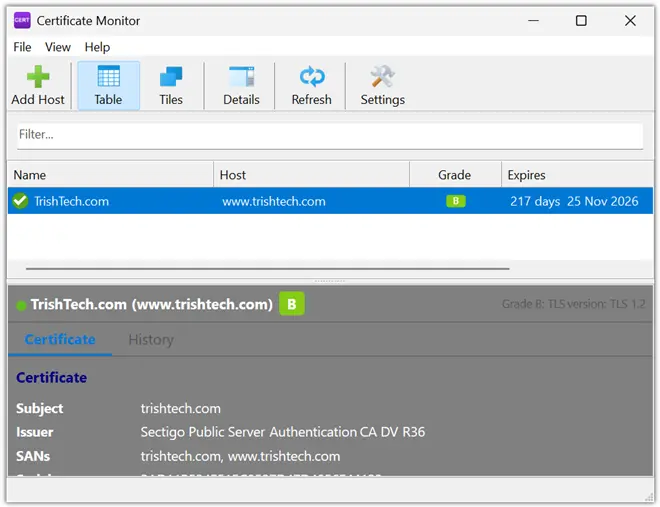
- Full Certificate Chain Inspection – Click any host to see the complete chain from your server’s certificate all the way to the root. Details include issuer name, subject alternative names (SANs), serial number, fingerprint, and public key information.
- Smart Desktop Notifications – Get pop-up alerts for upcoming expiries, already-expired certificates, or connection problems. You can set how many days in advance you want warnings.
- Flexible Views – Switch between a sortable table for deep analysis and a compact tile view for a quick overview of all hosts at a glance.
- Private Network Support – Monitor hosts that never face the public internet. This is a game-changer for corporate intranets and self-hosted services.
Because the tool is cross-platform and tiny (under 10 MB), it runs smoothly even on older machines or ARM-based devices.
How Certificate Monitor Works in Simple Steps
Using the program is straightforward. First, add the hosts you want to watch—domain names, IP addresses, or internal server names. The app quietly connects to each one, retrieves the TLS/SSL certificate and its full chain, and runs a series of health checks. It stores results locally and refreshes on a schedule you choose.
In the main window you see every host listed with its grade, expiry days, and status. Double-click any entry for a detailed panel showing the entire certificate chain. If something needs fixing, a notification pops up right on your desktop. No complicated setup scripts or command-line work is required. IT teams love the sortable table for generating quick reports, while home users appreciate the clean tile view.
Benefits for Everyday Users
Individuals running personal websites or home labs gain peace of mind without extra cost. Small businesses avoid expensive downtime and keep customer trust intact. System administrators managing dozens of servers save hours each month because the tool handles the boring monitoring work automatically.
Because it respects privacy and works offline for internal checks, Certificate Monitor fits perfectly in regulated industries where data cannot leave the building. Best of all, it is free forever—no hidden fees or “premium” upgrades. You simply download, install, and start monitoring. And there is a portable version too.
Conclusion
Certificate Monitor proves that powerful security tools do not need to be expensive or complicated. It delivers professional-grade TLS/SSL monitoring with a simple interface, rock-solid privacy, and zero cost. By catching expiry dates early, spotting weak configurations, and supporting both public and private hosts, it helps keep your digital world safe and trustworthy.
You can download Certificate Monitor from https://www.softperfect.com/products/toolkit/certmonitor/.